
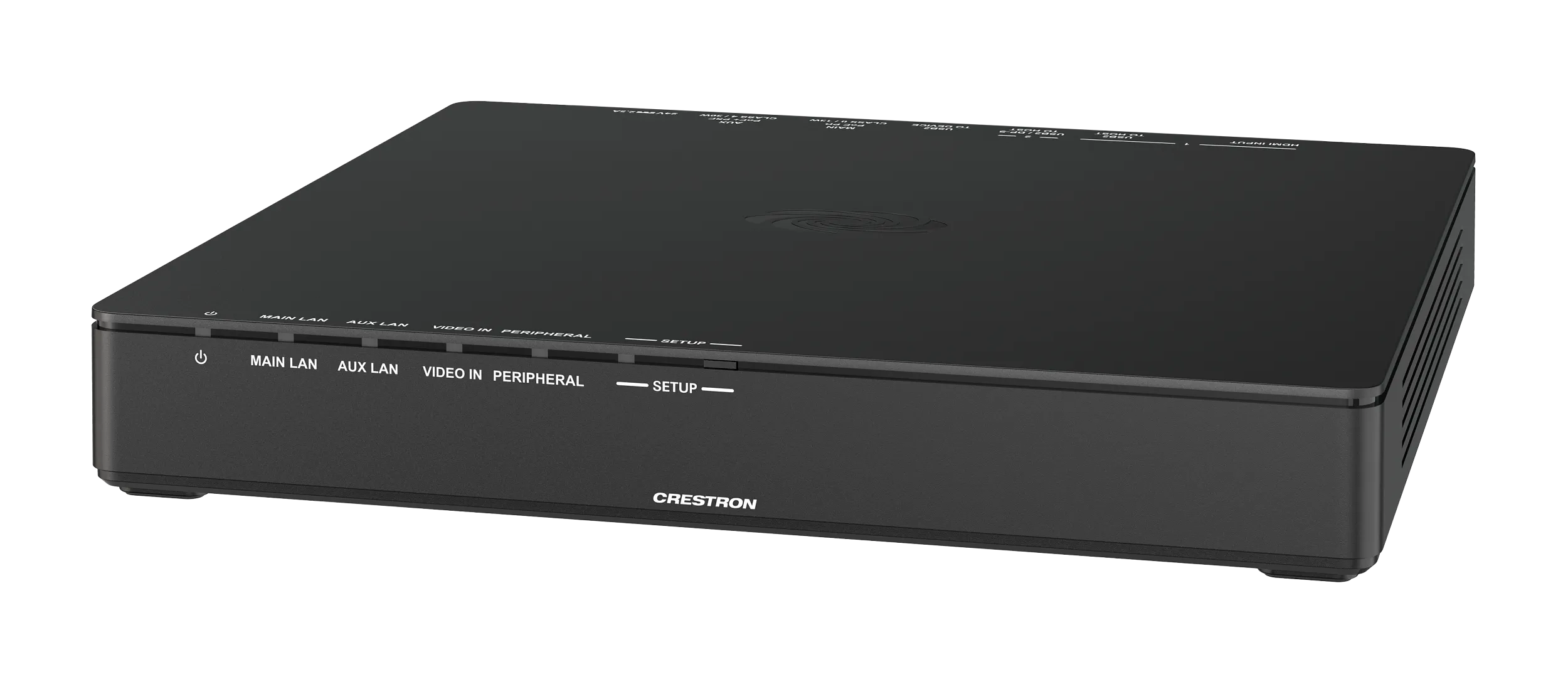
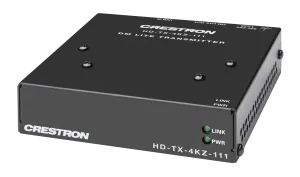
AirMedia® Series 3 Bağlantı Uç Noktası (AM‑TX3‑200), Wi‑Fi® ağı özellikli bir AirMedia Series 3 Alıcıyla eşleştirildiğinde kablosuz sunum ve konferansa1 olanak tanır. Üretken bir toplantı veya öğrenme ortamı oluşturmak için AM‑TX3‑200'ü uyumlu bir AirMedia alıcısıyla birlikte konferans odalarında, küçük alanlarda, sınıflarda veya hemen hemen her alanda kullanın.
Öne Çıkan Özellikler
- Tek bir USB-C® bağlantısı veya HDMI ve USB bağlantıları aracılığıyla kişisel cihazlara bağlantıyı kolaylaştırır
- 4K30 çözünürlüğe kadar içerik paylaşımını destekler ve oda içi konferans çevre birimlerine erişim sağlar
- Birlikte verilen braketi kullanarak masaların altına, podyumlara ve diğer konumlara montaj dahil olmak üzere esnek kurulum ve dağıtım seçenekleri
- Bağlı bir kullanıcı cihazı aracılığıyla PoE, DC gücü veya USB-C dahil çok yönlü güç seçenekleri
- DC gücüyle, bağlı bir dokunmatik ekrana güç sağlamak için PoE+ geçişi mevcuttur
- Wi-Fi® özellikli AirMedia® Seri 3 Alıcılarla uyumlu
- Wi-Fi Direct, Altyapı Wi-Fi veya kablolu ağ kullanarak AirMedia Alıcısıyla iletişim kurar
- Yazılım veya sürücü kurulumu gerekmez
Teknik Özellikler
| Ethernet | 100/1000 Mbps, autoswitching, autonegotiating, full/half duplex, TCP/IP, UDP/IP, DHCP, SSL, TLS, 802.3at compliant |
|---|---|
| Wi‑Fi | Çift bantlı Wi-Fi 6 802.11a/b/g/n/ac/ax (2,4 GHz ve 5 GHz); 80 Mbps’de 23 m’ye (70 ft) kadar menzil, sahaya özgü koşullara bağlıdır; daha fazla bilgi için Kablosuz En İyi Uygulamalar belgesine bakın. |
| HDMI Input | EDID |
| USB | USB 2.0 |
| OS Support | Windows 10, Windows 11, macOS® 11 veya üzeri |
| Giriş Sinyal Tipleri | DisplayPort Alt Mode over USB-C; HDMI |
| Çıkış Sinyal Tipleri | Ağ akışı; eşleşmiş bir AirMedia Series 3 alıcı tarafından alınır |
| Maximum Resolution | 3840×2160@30Hz (2160p30); çıkış çözünürlüğü eşleştirilmiş AirMedia Series 3 alıcının HDMI® çıkışına göre belirlenir. NOT: Tüm video girişleri seçilen HDMI çıkış çözünürlüğüne ölçeklenir. |
| Çıkış Sinyal Tipi | Ağ akışı; eşleşmiş bir AirMedia Series 3 alıcı tarafından alınır |
| Giriş/Çıkış Formatı | 2 channel LPCM |
| HDMI INPUT | (1) HDMI Type A konnektör; HDMI dijital video/ses girişi; içerik paylaşımı için kişisel cihaz bağlanır. |
| USB2 TO HOST | (1) USB-C konnektör; çevre birimlerine erişim sağlar. USB-C’si olmayan cihazlar için USB-C’den USB-A’ya kablo kullanın. |
| USB2 / DP-S TO HOST (host’a) | (1) USB-C konnektör; DisplayPort Alt Mode ile sunumu ve çevre birimlerine erişimi destekler |
| USB2 CİHAZA | İleride kullanım için ayrılmıştır |
| MAIN PoE PD | (1) 8 pinli RJ-45 konnektör; 100BASE-TX/1000BASE-T Ethernet portu ve PoE Sınıf 0 |
| AUX PoE+ PSE | (1) 8 pinli RJ-45 konnektör; 100BASE-TX/1000BASE-T Ethernet portu ve PoE+ Sınıf 4; etkinleştirilirse, geçişli ağ erişimi sağlamak için dokunmatik panel gibi bir cihaz bağlanır. Cihaz DC güç kaynağıyla beslendiğinde PoE+ sağlar. |
| 24V 2.5A | (1) 2,1 x 5,5 mm DC güç konnektörü; 24VDC güç girişi; PW-2420RU güç ünitesi ayrı satılır |
| Power | (1) Beyaz LED; yerel güç ünitesi, PoE veya bağlı USB-C cihazından güç geldiğini gösterir |
| MAIN LAN | (1) Beyaz LED; ana ağ arayüzünde ağ bağlantısı olduğunu gösterir. |
| AUX LAN | (1) Beyaz LED; yardımcı ağ arayüzünde ağ bağlantısı olduğunu gösterir |
| VIDEO IN (video girişi) | (1) Beyaz LED; USB-C veya HDMI video sinyalinin varlığını gösterir |
| PERIPHERAL | (1) Beyaz LED; konferans çevre birimlerinin cihaz tarafından kullanımda olduğunu gösterir |
| SETUP | Bir AirMedia alıcısıyla eşleştirme için (1) beyaz LED ve (1) basma düğmesi |
| RESET | Cihazı fabrika varsayılanlarına döndürmek için (1) gömme basma düğmesi |
| Güç Kaynağı | USB : kişisel cihaza USB-C bağlantısıyla beslenir; veya PoE : IEEE 802.3at Sınıf 0 beslenen cihaz; veya adaptör (ayrı satılır): giriş 100-240VAC, 50/60 Hz; çıkış 24VDC’de 2,5A; model: PW-2420RU |
| Güç tüketimi (boşta, PoE veya DC ile beslenirken) | 4W |
| Güç tüketimi (kullanımda, PoE veya DC ile beslenirken) | 12.5W |
| Güç tüketimi (kullanımda, USB2/DP-S to HOST ile beslenirken) | 2.5W |
| Temperature | 0° ile 40°C arası (32° ile 104°F) |
| Humidity | 10% to 90% RH (noncondensing) |
| Heat Dissipation | 47.5 BTU/hr |
| Chassis | Plastik, siyah yüzey, (4) entegre montaj delikli, havalandırmalı yanlar |
| Mounting | Freestanding, surface mount |
| Mounting Bracket | Metal |
| Height | 1.26 in. (32 mm) |
| Width | 8.85 in. (225 mm) |
| Depth | 7.08 in. (180 mm) |
| Ağırlık (cihaz) | 21.06 oz (597 g) |
| Ağırlık (montaj braketi) | 11.18 oz (317 g) |
Kullanım Alanları
- Kurumsal ve ticari projelerde transmitter çözümü
- Toplantı odaları, akıllı binalar ve otomasyon sistemlerine entegrasyon
- Profesyonel kurulum ve merkezi yönetim
Sıkça Sorulan Sorular
Crestron AM-TX3-200 Türkiye’de satılıyor mu?
Evet. Avelkon, Crestron Türkiye yetkili distribütörüdür. Stok, fiyat ve proje teklifi için bizimle iletişime geçebilirsiniz.
Teknik destek ve kurulum sağlanıyor mu?
Evet, yetkili distribütör olarak ürün seçimi, kurulum ve satış sonrası destek sunuyoruz.
Avelkon, Crestron Türkiye yetkili distribütörüdür. Fiyat ve proje teklifi için iletişime geçin.
Değerlendirmeler
Henüz değerlendirme yapılmadı.